
Try Door Ops free. No card. No automatic charge. Build better door-company software with us.
Free beta & paid plansKlipboard alternative
Door Ops vs Klipboard
for door contractors.
Klipboard is a general field service platform with three plans, user minimums and 12 or 24 month terms. Door Ops is built only for door work, with the whole job operation on Core from one engineer seat, billed monthly. Here is the comparison, with sources.
Short version
- Klipboard puts custom forms, asset management, PPM, GPS and the client portal on its Professional plan, minimum five users, 12 or 24 month term. Door Ops includes them on Core from one seat.
- Klipboard has a native offline iOS and Android app and a 4.6 rating on GetApp. Door Ops is a web app with no published reviews yet.
- Klipboard is not door-specific. Door Ops ships door presets, door-type asset records and RAMS out of the box.
Klipboard facts checked 10 September 2026 from the pages linked below. Their prices and plans are theirs to change.
Pricing and terms
What you pay, and for how long.
Door Ops prices are the live rates on our pricing page. Klipboard figures are quoted from their public pages, checked 10 September 2026.
| Door Ops | Klipboard | |
|---|---|---|
| Entry price | Eligible founders pay £39 per engineer and £19 per office user monthly (£390 / £190 annually). Standard rates are £45 / £22 monthly. Plus adds £29 a month, Scale £79. See pricing for founder eligibility; prices exclude VAT. | Per user a month on a 12 or 24 month term. The pricing page showed US dollars when we checked: Starter $28 to $34, Innovator $35 to $40, Professional $45 to $50. A UK listing (AppInsight, July 2023) quoted £19, £29 and £39. |
| Who counts as a user | Engineers and office users have different rates. Someone who does both counts once as an engineer. External subcontractors use job credits, not seats. | Anyone who needs access, office or field, at the same rate. |
| Minimum | One engineer seat. | Starter 2 users, Innovator 4, Professional 5. |
| Contract | Monthly, billed monthly, cancel before the next bill. Annual is optional and paid up front. | 12 or 24 months. Annual payment saves about 15%. |
| Free trial | free trial of the full product. No card needed to start. | Free trial, no card. Demos for teams of two or more. |
| Onboarding fee | None. Guided setup checklist and UK-based support are included. | Waived on annual plans. Monthly-paid Innovator and Professional show a one-off onboarding and training fee ($2,500 and $3,800 on the page we saw). |
| Feature gating | Lite covers paperwork; Core adds full job management; Plus adds stock, purchasing approvals, detailed reporting and integrations. Compare current feature packages and team totals on our pricing page. | Starter: scheduling, template form, photos, signatures. Innovator adds quoting, invoicing, Xero and QuickBooks, purchase orders. Professional adds the form builder, PDF designer, assets and QR, PPM, contracts, inventory, GPS and timesheets, client portal. |
For door work
The features a door company actually uses.
Not a 200-row feature grid. The twelve things that decide whether the office chases the job sheet or reads it.
| Door Ops | Klipboard | |
|---|---|---|
| One record per door job | One record per job and per customer: quote, drawings, RAMS, photos, worksheet, notes and the PDF you sent. That is the product. | Client and site records, job history, documents and notes. Asset records with door type, motor spec, service history and warranty (Professional). |
| Worksheets and forms | Door Ops door presets, worksheets on the phone, photos and signatures on every tier; the custom form builder is on Core. | Template job form on Starter; forms library on Innovator; drag and drop form builder and PDF designer on Professional. Mentions BS EN 16005 inspection forms. |
| AI review | AI action summaries, wording checks and a compliance guardian, included as monthly credits on Core and Plus. | Not advertised on the pricing or automatic door pages. |
| Assets and PPM | Asset register with QR labels, PPM planner and contracts on Core. | Asset register, QR tagging and PPM scheduling on Professional only. |
| RAMS | On-job risk assessments on every tier; the RAMS builder, library and packs on Core. | Risk assessments as custom forms, which needs the Professional form builder. |
| Subcontractors | Send a job to a subcontractor by secure link. They complete the worksheet without a seat. | Not described. Every person who needs access is a paid subscription. |
| Engineer and vehicle tracking | Live engineer location and customer tracking links. Vehicle tracking accepts a telematics feed; Door Ops does not supply hardware. | Live GPS tracking and timesheets on Professional. |
| Customer portal | Customer portal on Core. | Client portal and work requests on Professional. |
| Quotes, invoices, accounts | Quotes, invoices, purchase orders, stock and job costs built in. Native Xero, Sage and QuickBooks invoice push is in build; today invoices leave by API and webhooks. | Quotes, invoices, purchase orders, Stripe and mobile card payments, Xero and QuickBooks sync from Innovator. |
| Mobile app | Web app, installable on the phone home screen. Worksheet progress survives lost signal, but it is not an offline-first native app. | Native iOS and Android apps that work offline, which Klipboard rightly points out matters in basement loading bays. |
| API and automation | REST API, webhooks, Zapier and an MCP server for AI agents (API and MCP are separately scoped access). | Automated SMS and email customer communications from Innovator. API is listed as a feature on GetApp. |
| Track record | No published reviews, case studies or named customers yet. Door Ops launched in 2026 and says so. | 4.6 from 27 reviews on GetApp UK, a 97% retention claim, chat support included, customer success manager on Professional. |
See the Door Ops side
Judge it on the screens, not the table.
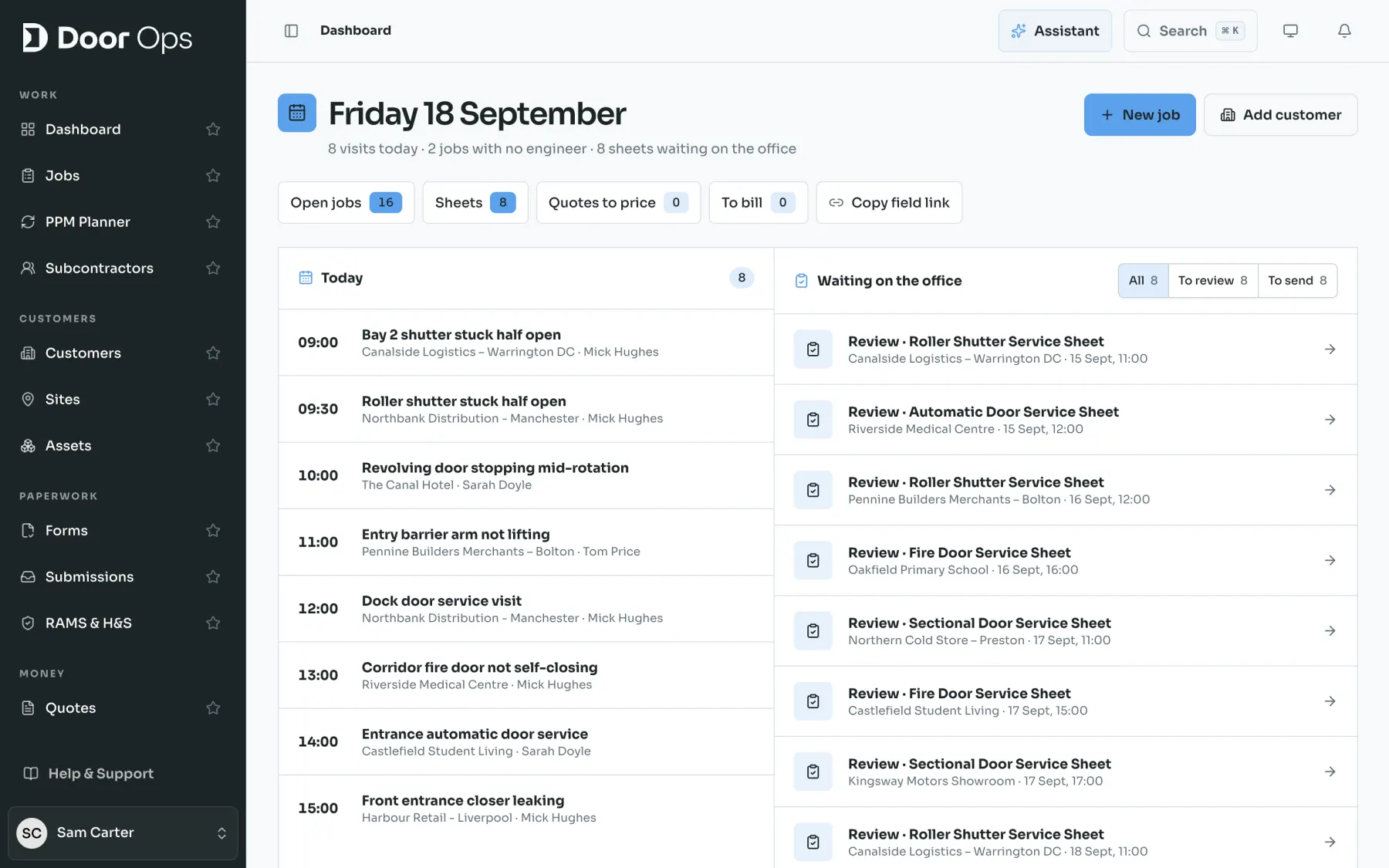
Real Door Ops screens from a sample door company. This is the office view your team would work in every day.
Honest answer
When Klipboard is the better fit
- Your engineers work where there is no signal and you need a native app that is fully offline, not a web app that saves progress.
- You are already deep in Xero or QuickBooks and want two-way sync today rather than an API push.
- You have five or more users and are happy to commit to 24 months for the lower rate.
- Door work is one of several trades in the business.
Where Door Ops wins
When Door Ops is the better fit
- You are a one, two or three person door company. Klipboard needs two users on Starter and five on Professional; Door Ops starts at one engineer.
- You want assets, PPM, custom forms, RAMS and the portal without paying Professional rates and signing for a year or two.
- You want door presets and door-type records on day one instead of building forms.
- You want the AI summary of every worksheet, which Klipboard does not offer.
Still on a calendar and the notes app?
Most door firms are not switching from software at all.
Ask a door engineers group what they run jobs on and the honest answers are a phone calendar, the Notes app and a WhatsApp group for quotes and measures. That works until the third engineer, or the customer who asks what you found last time. Door Ops keeps your calendar and Xero, and gives every job one record: customer, quote, drawings, RAMS, photos, worksheet and the PDF you sent.
Migration
Moving from Klipboard
Keep Klipboard running while you try Door Ops. Nothing here asks you to cut over on day one.
- 1There is no Klipboard connector. Export clients, sites and assets from Klipboard to Excel, then import customers and sites into Door Ops from Settings using the Door Ops template.
- 2Bring job history across with the file import under Settings, Integrations, or leave Klipboard read-only until the last contract expires and start clean.
- 3Rebuild your key forms from a Door Ops door preset first, then add the fields you actually used. Most door firms find the preset covers the sheet.
Common questions
How much does Klipboard cost in the UK?
Klipboard prices per user a month on a 12 or 24 month term with a minimum of two, four or five users depending on plan. The page showed US dollars when we checked ($28 to $50 per user); a UK listing from 2023 quoted £19 to £39. Ask Klipboard for a sterling quote before comparing.
Does Door Ops have a native offline app like Klipboard?
No. Door Ops is a web app you install on the phone. Worksheet progress survives lost signal, but it is not an offline-first native app. If that is your daily reality, Klipboard is the safer choice on that point.
Can I import my Klipboard data?
Export clients, sites and assets to Excel from Klipboard and import them into Door Ops from Settings. There is no direct Klipboard connector, unlike Joblogic and BigChange.
Where are these Klipboard figures from?
Klipboard’s pricing and automatic door pages, GetApp UK and AppInsight, checked 10 September 2026. The links are at the bottom of this page.
Other comparisons
Weighing more than one?
Door Ops vs Joblogic
Joblogic gates PPM, engineer tracking, custom forms and the customer portal behind Premium and Enterprise. Door Ops includes all of them on Core.
Door Ops vs Clik
Clik sells certificates (Clik Compliance) and job management (Joblogic FSM) as two products that sync. Door Ops keeps the worksheet, the job and the customer PDF in one record.
Door Ops vs BigChange
The BigChange pricing page is a demo form. Its August 2025 blog puts JobWatch at £79.95 per office or mobile user a month; Door Ops lists £45 per engineer and £22 per office user (£39 / £19 for eligible founders).
Door Ops vs ServiceM8
ServiceM8 charges by job volume, £25 to £269 a month with unlimited users on paid plans. Door Ops charges per engineer and office seat, so a small door team usually pays ServiceM8 less.
Door Ops vs Tradify
Tradify costs £34, £37 or £44 per user a month and every user pays the same. Door Ops charges £45 per engineer and £22 per office user, so the sums depend on your office headcount.
Door Ops vs Jobber
Jobber prices in US dollars: $49 a month for one user on Core with no commitment, rising to $199 for one user on Grow. Door Ops prices in pounds per engineer and office seat.
Door Ops vs Commusoft
Commusoft publishes no prices and signs licences for 12 months that renew annually. Door Ops shows its rates and bills monthly from one engineer seat.
Door Ops pricing
Work out your monthly cost by engineers and office users. No demo call needed.
Sources, checked 10 September 2026
- Klipboard pricing page
- Klipboard automatic door maintenance software page
- GetApp UK Klipboard listing and reviews
- AppInsight Klipboard pricing (checked by them July 2023)
- Door Ops pricing
Klipboard is a trademark of its owner. Door Ops is not affiliated with Klipboard. If a figure above is out of date, tell us and we will correct it.
Try Door Ops beside Klipboard with a free trial.
Import your customers, put one real job through the worksheet, review the summary and send the PDF. Decide with your own data, not ours.